Thursday, February 23, 2012

PlayStation Vita

Demonstration of how the rear touch panel of 
the PlayStation Vita worksThe PlayStation Vita handheld in use with the
 hands of a user demonstrating the new LiveArea touch driven menu 
system Sony's PlayStation Vita, previously codenamed "Next Generation Portable" (NGP), is the long-rumored successor to the PlayStation Portable hardware series. PS Vita retains the familiar general form of the PlayStation Portable hardware series while dramatically improving on virtually every aspect of its use with powerful and exciting new features including: dual touch pads at the front and rear, dual cameras at the front and rear, dual analog sticks, a 5-inch OLED screen, six-axis motion sensors and a three-axis electronic compass and exceptional built-in connectivity via Wi-Fi.* Taken together this makes for a handheld gaming device that truly signals the entry of handhelds into the world of Next-Gen gaming.
Handheld gaming enters the Next-Gen.

Blur the Lines Between Entertainment and Reality.

PlayStation Vita is designed to blur the lines between interactive entertainment and reality in a variety of ways. Reaching beyond the capabilities of every handheld gaming console that has come before it, in this model of Vita players have access to a vast amount of content via improved Wi-Fi, allowing for maximum connectivity wherever you go. (An additional Vita model allows for Wi-Fi and always-on 3G connectivity**) Its 5-inch OLED front multi-touch display brings brilliant images to life and allows for a new touch driven navigational system, while the additional multi-touch pad on its back surface will allow users to interact with games and characters that they encounter within them with a simple movement of their fingertips. The real world and the game world are seamlessly merged with front and rear camera enabled augmented reality. Additionally, services created specifically for Vita will be available on PlayStation Network. These services are designed help users take their gameplay, as well as interaction with other gamers, to new levels.
Front angled view of the PlayStation Vita 
showing the large screen, the two analog sticks and the inward facing 
camera
Additional features include: dual analog stick controls, a 4 core CPU, system-specific flash card media support for game and media saves, mobile PlayStation trophy support, built-in three-axis gyroscope, three-axis accelerometer and functionality.
New controls include dual analog sticks, three-axis gyroscope and accelerometer and 2 cameras.
Superior design features, including touchpads at the front and rear.
The PlayStation Vita showing insertion of new
 flash-based storage card
New dedicated flash-based game medium, with one slot for game content and a second for personal content.
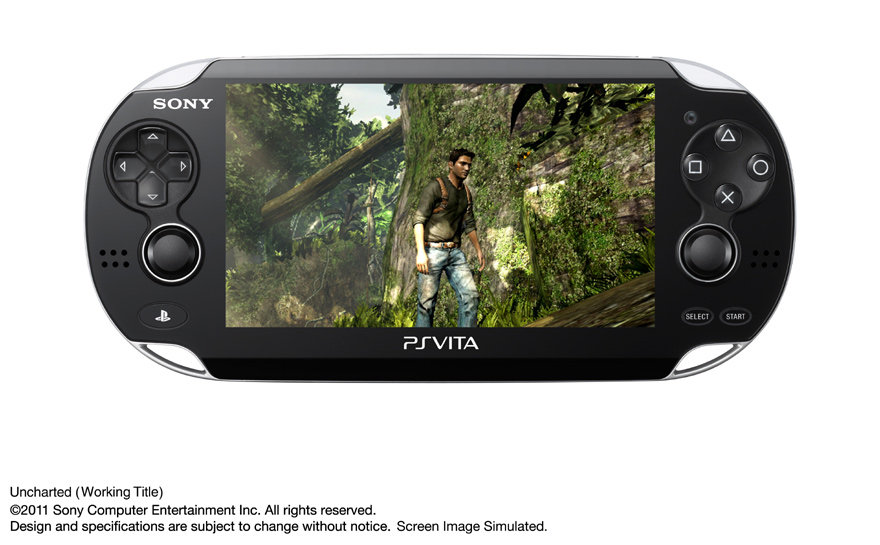
A gameplay screen from an Uncharted game 
played on the PlayStation Vita
The best in content, from classic PS One games to your favorite franchises and new ones going forward.

Vita-specific PlayStation Network Functionality

Near
"Near" is a core PlayStation Vita feature composed of location-based services, that utilize PlayStation Network. Near, developed specifically for this service and the network, will be pre-installed in the system to let users find out what their friends in the vicinity are playing now or what they were playing recently. Users can meet their friends and new players virtually, regardless of what games they are playing, simply by sharing their game information across different dimensions of time and distance.
LiveArea and Activity Log
Every game title for PlayStation Vita will be provided with a space called "LiveArea" where users can share the fun and excitement with other players. Users will have access to the latest information of games provided from SCE and third party developers and publishers through PlayStation Network. Additionally, Vita users will be able to view "Activity Log" which is constantly updated with accomplishments from users who are playing the same game, which in turn can trigger active real-time communication among users.

The Best in New and Classic Content

In addition to containing the best in new handheld gaming hardware technology, Sony's PlayStation Vita provides users with the best in quality content. All your favorite game franchises are coming to Vita, including but not limited to Uncharted in Uncharted Golden Abyss, LittleBigPlanet, Hot Shots Golf, ModNation Racers, Wipeout and many more -- including all new game launches -- yet to be announced. Joining these new offerings, players will also have full wireless access to the PlayStation Store. Here, via Vita's improved Wi-Fi capabilities owners can download new game add-ons, movies, comics and PS One classics ported over for handheld play. PlayStation Vita also features full backwards compatibility (via download) to all PSP games. Together this powerful merging of hardware and software is destined to create entertainment experiences unlike anything else available in the handheld gaming market.

Vita Features

  • Multi-touch 5-inch organic light emitting display (OLED) as the front display
  • Multi-touch pad on the rear of the device
  • Dual analog sticks
  • Two digital cameras (front and rear)
  • Software titles on small, Vita-specific flash memory-based cards
  • Three motion sensors, gyroscope, accelerometer and electronic compass
  • Advanced and fast Wi-Fi connectivity
  • Free PlayStation Network access, including trophy support and new Vita features "LiveArea" and "Near"
  • Vita can play PSP titles, minis, PS one classics, video and comics from the PlayStation Store

Technical Specifications

  • CPU - ARM Cortex-A9 core (4 core)
  • GPU - SGX543MP4+
  • External Dimensions - Approx. 182.0 x 18.6 x 83.5mm (width x height x depth) (tentative, excludes largest projection)
  • Touch Screen - 5-inches (16:9), 960 x 544, Approx. 16 million colors, OLED Multi touch screen (capacitive type)
  • Rear Touch Pad - Multi-touch pad (capacitive type)
  • Cameras - Front camera, rear camera
  • Game Media/Storage - New Vita-specific dedicated flash-based game medium; dual slots, one for the new game medium, the other is for storage media to be utilized for personal content and download content
  • Sound
    • Built-in stereo speakers
    • Built-in microphone
  • Sensors - Six-axis motion sensing system (three-axis gyroscope, three-axis accelerometer), three-axis electronic compass
  • Location
    • Built-in GPs
    • Wi-Fi location service support
  • Keys / Switches
    • PS button
    • Power button
    • Directional buttons (Up/Down/Right/Left)
    • Action buttons (Triangle, Circle, Cross, Square)
    • Shoulder buttons (Right/Left)
    • Right stick, Left stick
    • START button, SELECT button
    • Volume buttons (+/-)
  • Wireless communications
    • IEEE 802.11b/g/n (n = 1×1) (Wi-Fi) (Infrastructure mode/Ad-hoc mode)
    • Bluetooth 2.1+EDR (A2DP/AVRCP/HSP)
  • Battery - Internal/embedded (not removable)
* Connectivity subject to Wi-Fi availability coverage limitations.
** 3G functionality and coverage requires purchase and activation of an additional AT&T data plan. Connectivity subject to 3G coverage limitations.

Product Description

Sony's PlayStation Vita, previously codenamed "Next Generation Portable", is the successor to the PlayStation Portable hardware series. Vita retains the familiar general form of the PlayStation Portable hardware series while dramatically improving on virtually every aspect of its use with powerful and exciting new features including: dual touch pads at the front and rear, dual cameras at the front and rear, dual analog sticks, a 5-inch OLED screen, six-axis motion sensors and a three-axis electronic compass and exceptional built-in connectivity via Wi-Fi. Taken together this makes for a handheld gaming device that truly signals the entry of handhelds into the world of Next-Gen gaming.

Apple iPad 2 MC916LL/A Tablet (64GB, Wifi, Black) NEWEST MODEL

People need to be aware that the reviews you see for the iPad often reflect the old Mac/PC platform wars with some people making comments who simply don't like iPads from a distance, without actually owning one, because they see it as part of the deplorable Apple mania they find so distasteful. They're entitled to their opinion, of course, but it is unfortunate they skew the evaluation of this product without the deep acquaintance one needs in order to give it an insightful evaluation.

I have taught computer science at the college level for 26 years and have had computers with all kinds of operating systems. I don't own Apple stock and have never known anyone who works at Apple. I therefore have no connection to Apple.

Apple iPad 2 MC916LL/A Tablet (64GB, Wifi, Black) NEWEST MODEL

I have had my iPad for about a month and read a fair number of reviews before I purchased, spent some time using one at the store, and thought about what I might use one for, in contrast to my laptop with which I am well satisfied. People too often think of computers in terms of hardware, the specs and looks, instead of the software and the functionality. You should ask yourself, "What will I use this for that solves a problem I would like to have solved?" Software is always more important than hardware, even though it is the hardware that makes an impression.

The iPad is not a laptop and is not principally a production computer, that is, a computer on which you are going to develop web pages, do serious graphics editing, or write a book. You could use your new Taurus to tow a trailer, but that is not what it is designed to do well. These things can increasingly be done on an iPad, but I don't believe they will ever be what it is best at. It is a portable media machine with an inviting touch interface that requires a somewhat different set of skills, which take a modest amount of time to learn. Surfing the web, checking email, watching movies, playing games, looking at new cars, reading the Economist magazine, all work better on an iPad than a laptop. It does these things very well indeed. There are now 80,000 apps for a wide variety of activities--given its design intent. The apps are either free or reasonably priced, so you can get a bunch from the "app store" for little investment. As with Amazon, you can see what other people think of an app before getting one.

This would be a splendid acquisition for small children, for teens deep into social networking, for an adult wanting to drop into the love seat for a quick look at what is happening in the world, for a senior citizen who wants a simple, inviting system with few hassles, to stay in touch with grandchildren. The iPad is not a light laptop; it is instead a different way to use computing to do a wide variety of consumption and communication--not principally production.

In my experience, its wi-fi is adroit from one environment to another. It "knows" where it is geographically, scans its environment for wi-fi, and accesses wi-fi seamlessly. At this point in time, we should expect no less. I cannot address the 3G communications since I have a wi-fi only (I am not convinced of the value of the 3G and I can use my phone as a hotspot). I have never had it crash, though I have had to back myself out of apps that seemed to have no logical next step. This was the result either of my ignorance or the fact that there is less of a standard user interface from app to app than there is in classical GUIs such as OS X and Windows.

For the laptop lugging road-warrior, it should be noted, this is not going to be a full replacement. I now take my laptop and my iPad when I go into the college. But much of the time there, I use my iPad because it is so light, convenient and useable. I use it to teach my classes and often reference traditional texts from the iPad instead of lugging them along to class. I develop my own web pages on my 27" desktop which is the right environment for such development; I wouldn't expect to do that on an iPad. In education (and evidently in medicine), it is proving to be a real boon. The enterprise situations where portable information access and transmission are critical will find this a compelling solution. The heavy Photoshop user or music track editor will still need a conventional computer, either laptop or desktop.

I purchased the 64GB version, which may be more storage than I need. But since it will drive my 50" screen downstairs I figured I would begin to load lots of pictures and favored music, so it may prove a wise choice in the long run. It can swallow up entire evenings with the music-augmented slide shows it can do. In fact, you may begin to wonder if you need cable TV. Conventional content providers should be worried about the iPad since it provides yet another way for the user to determine viewing experience. But if you are still drawn to cable, it makes a fine remote control.

Before people evaluate this new kind of computing, they need to spend a month or so with it to identify what it does well and what would be better left to other kinds of computing solutions. I fear some of the evaluations here (both glowing and critical) are not well informed and so do not serve the readers well. So read these reviews with a critical eye.

October 18 2011 Update:

I continue to find my iPad remarkably productive and productive in ways I would not have anticipated. It does indeed redefine how we can use computing so that it does the work we want to do with minimal impediments. I now leave my laptop at school and take my iPad back and forth since 80 or 90% of the time the iPad does all I need to do. I use it 3 or 4 hours a day.

I just ordered my wife an 11" MacBook Air with the larger RAM and storage, which might seem to contradict what I said in my review. I don't believe it does for the following reasons. She needs to do serious editing of Word documents for the volunteer work she does for the college and still wants the joys of a 2-pound piece of elegant hardware. She is an excellent typist and likes the feel of the Air's keyboard. A keyboard can be added to an iPad, but it's a kludgy add-on that compromises the point of the iPad: an ultra-light slim, touch-interface device that does most of what traditional computing does without the impediments of mouse and keyboard and weight. The 11" Air is a gem of engineering with many of the advantages of the iPad but it is more capable of the production I spoke of in my review since it is a full OS X Lion machine--so it is fully capable of running traditional production software such as Word or Photoshop or, for that matter, Windows.

The Air and the iPad illustrate the difference between a consumption device (iPad) and a production device (Air). Much of what is appealing in the iPad can be had in the Air, but at the cost of an additional several hundred dollars. It's not the solution I want since I don't want the keyboard getting in the way when I want to curl up with a consumption device in my favorite love seat or use it to assist my teaching in class. My wife prefers the Air since email and other typing-intensive production activities are so important to her. In a word, the iPad is distilled essence of computationally assisted consumption.

I guess we will give the phrase "mixed marriage" new meaning!